The VX100 is a professional LED display controller. Besides the function of display control, it also featurespowerful front-end processing, so an external scalar is no longer needed. With integrated professionalinterfaces, VX1000, with excellent image quality and flexible image control, greatly meets the needs ofthe broadcast industry. It's friendly in user-interface. so that the display to work has never been as easierand more enjoyable as with VX1000.
Basic Setup
Follow the directions below for controller setup when using ViPlex software:
1.Press the HDMI button on the front panel of the controller so that it turns red.
2.Press the SCALE button on the front panel of the controller so it is disabled.
Change brightness
1.Return to main menu interface.
2.Press the Knob to select the corresponding value of brightness.
3.Rotate the Knob to adjust value.
4.Press Knob again to send new brightness value to screen.
Tip: Brightness will vary based on the event being indoor or outdoor as well as cloud coverage and time of day. Thismay need to be changed multiple times depending on duration of event.
Test modes
1.Start at main menu interface.
2.Press the knob and scroll to Display Control.
3.Press the knob and scroll to test pattern.
4.Scroll through the 8 different test patterns.
5.To go back to normal mode press ESC and scroll back up to Normal.
Disable scaling
1.Check if the Scale 1 button is lit up red.
2.If so, Press that button again.3.Display should say auto scaling disabled.
Tip: See the VX4S user manual to set custom scaling when using other modes of display
Blackout screen
1.Press knob and scroll to Display Control.
2.Press knob again and scroll to black out.
3.Press knob again and screen should go black.
4.Another way is to press the Take button on the far right of the VX4S
Home Screen
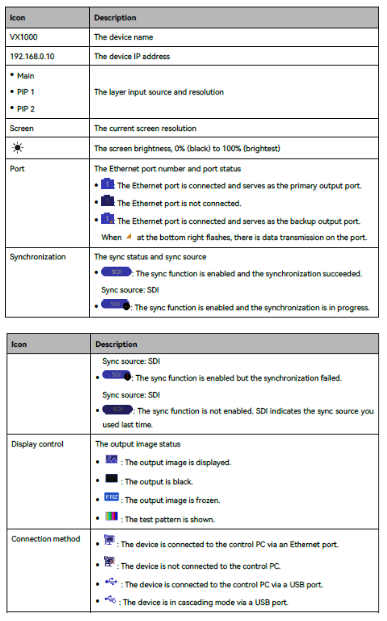
On the front of the controller there is a home screen that enables you to quickly identify what informationis being sent to the LED screen and help identify potential problems issues.